Restored LoadShare Program

Putting idle grid capacity to safe, flexible use

Most buildings use only part of the electrical capacity already wired to them. LoadShare places AI computers in that unused room, watches the transformer every second, and switches the computing off whenever the building or the grid needs the power back. The building owner earns a monthly hosting payment.

Free screening estimate · No equipment is installed until a site study and your utility confirm it is safe
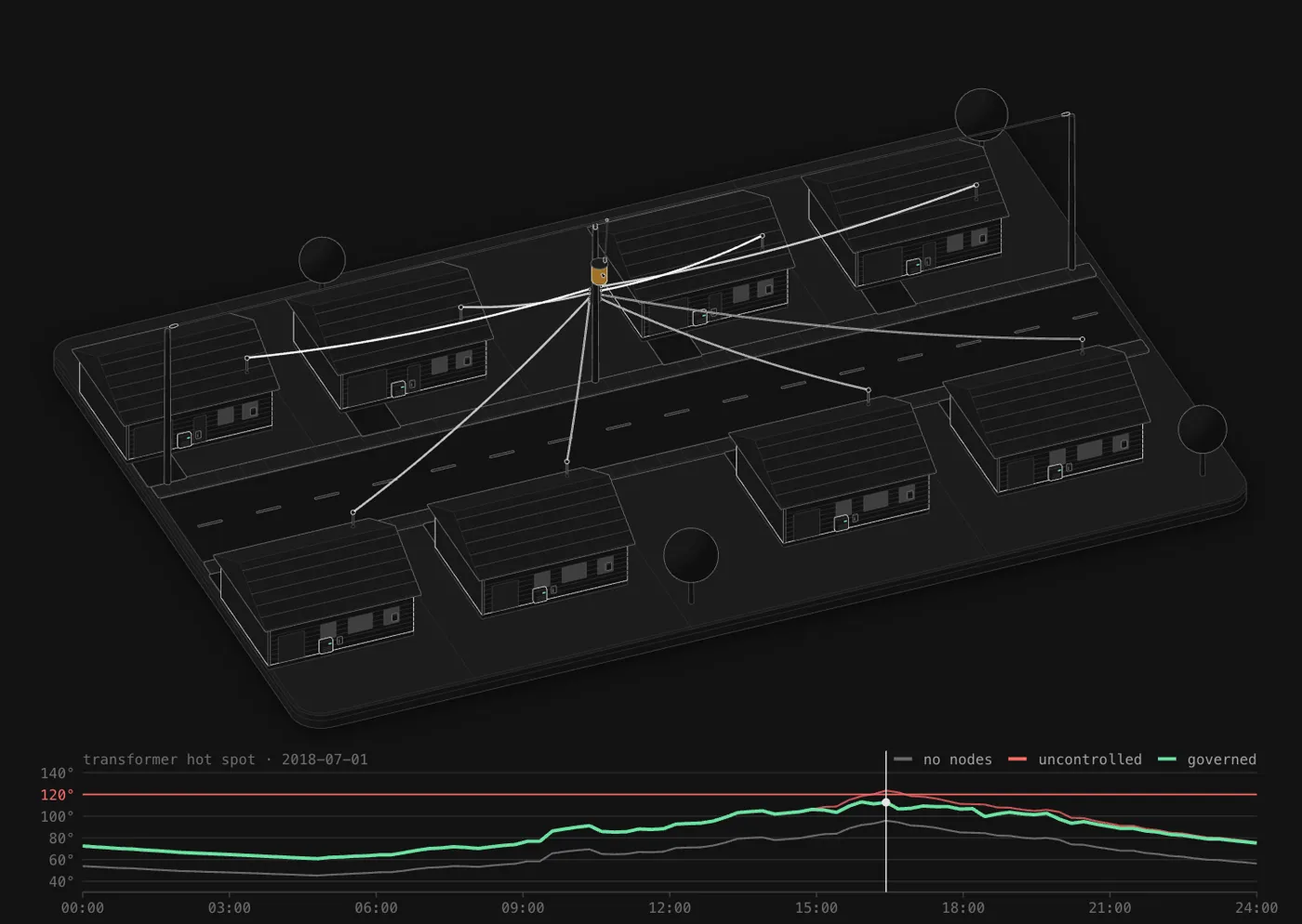
Eight homes on one pole transformer, each hosting an AI node; the chart shows the transformer staying under its temperature limit while uncontrolled computing would cross it
One street, one transformer: the computing eases off at the evening peak so the transformer stays under its limit.
0hours over the transformer’s rating in every example
10 of 10grid demand-response events honored
96–98%of the year the computers still run
Patent pendingtransformer-aware AI hosting
How it works

The building and the grid always come first

Computing is the most flexible load on the wire. LoadShare treats it that way.

1

Screen the site

Your address, building and (optionally) power bill give a year of 15-minute load against real local weather. We find how much room the transformer has, hour by hour.

2

Study with the utility

Before anything is installed, the utility confirms the transformer and service. Nothing goes in until the site study shows it is safe.

3

Computing steps aside

A site controller measures the load and lowers or switches off the computers when the building peaks, when the grid calls a demand-response event, or if anything looks wrong.

4

The owner earns

The AI operator pays for its own metered power plus a monthly hosting fee per computer, and the work moves to other sites whenever this one needs its capacity back.

What goes on site

A sealed AI node and a controlled hookup

The same parts at every site: the computer in a sealed outdoor enclosure, its own disconnect and meter, and a site controller that can always switch it off.

Cutaway of the sealed AI node: GPU, power supply, controller and cooling inside an outdoor enclosure
The node. One GPU computer in a sealed, weatherproof enclosure with its own controller, sensors and tamper switch.
Field install on a wall: utility meter, breaker panel, lockable disconnect and the AI node, wired in conduit
The hookup. Its own breaker and lockable disconnect beside the building’s panel. The building’s own circuits are never touched.
Free screening

Check your building

Enter the street address. We look up the building and its local weather and estimate what it could host. It takes about half a minute.

Add your power bills or meter data (optional)

A year of bills gives a better answer than building averages, and 12 months of 15-minute meter data is better still. Bills: PDF, JPG or PNG. Meter data: CSV or Green Button XML from your utility’s website.

Examples

Six real building types, one year of 15-minute data

Simulated on public NREL ResStock and ComStock building data for Mecklenburg County, NC, with 2018 weather, in nameplate mode: the transformer is never loaded past its rating.

Eight homes on one pole transformer, each with an AI node, and a chart of the transformer hot spot over a summer day
Example · simulated

A residential street

8 homes on one 37.5 kVA pole transformer

No room without upgrades. This transformer already runs at 99% of its rating at peak, so the program would not place computing here. Screening says no as often as it says yes.
Three apartment buildings sharing one pad-mount transformer with a node cabinet
Example · simulated

An apartment complex

36 units in 3 buildings on a 112.5 kVA pad-mount

36AI computers hosted
96.3%of the year computing
$10,800a year to the owner at $25/computer-month
A school equipment yard with the transformer, AI switchboard and computing enclosures
Example · simulated

A public school

75,000 sq ft on a 750 kVA transformer

456AI computers hosted
98%of the year computing
$136,800a year to the owner at $25/computer-month
Example · simulated

A government office

46,000 sq ft on a 300 kVA transformer

124AI computers hosted
96.5%of the year computing
$37,200a year to the owner at $25/computer-month
Example · simulated

A large office building

300,000 sq ft on a 1,500 kVA transformer

244AI computers hosted
96.3%of the year computing
$73,200a year to the owner at $25/computer-month
Example · simulated

A manufacturing plant

21,000 sq ft, two shifts, 225 kVA

No room without upgrades. This transformer already runs at 98% of its rating at peak, so the program would not place computing here. Screening says no as often as it says yes.

Without control, the same computers would push these transformers to 166% of their rating at the worst hour. Owner income shown at an illustrative $25 per computer per month; actual terms depend on the site and the operator. Read the background in Homes as grid-aware AI infrastructure.

Questions

What owners and utilities ask first

Will this raise my power bill?

No. The computers are on their own meter, and the AI operator pays for that power. The owner’s bill does not change.

Can it overload the transformer?

The site controller keeps the total load at or under the transformer’s rating, using its own current sensors, and a hardware contactor cuts the computing feeder if the software ever fails to. The utility reviews the site before anything is installed.

What happens during a heat wave or a grid emergency?

The computing is the first load to go. In the examples, every one of the year’s demand-response events was honored by shutting the computers off for the event.

How accurate is the screening?

It is an estimate from public data with a 10% safety margin on the building load, checked against real reference buildings. A power bill makes it better; a year of 15-minute meter data from your utility makes it much better. A site study comes before any installation.

What do you do with my information?

Every screening run is recorded in our model journal (address, building facts and results) so we can show how the program performs across many sites. Names and emails are kept separately and only used to send your report and follow up. If you add a bill or meter file, we save only the usage figures, utility and ZIP, and do not keep the file. See the privacy policy.

Utilities, schools and property owners: host a pilot

We are looking for a small number of pilot sites and utility partners. The site study is free.

Talk to us

Building outlines © OpenStreetMap contributors (ODbL). Weather: NASA POWER. Addresses: US Census Geocoder. Reference buildings: NREL ResStock and ComStock. Estimates only; not a utility interconnection study.